
The toolbar popup
Click the Aquilifer icon in your browser toolbar to open it: a quick-glance surface for what's connected and how close you are to your own limits, without opening full settings.
What it shows
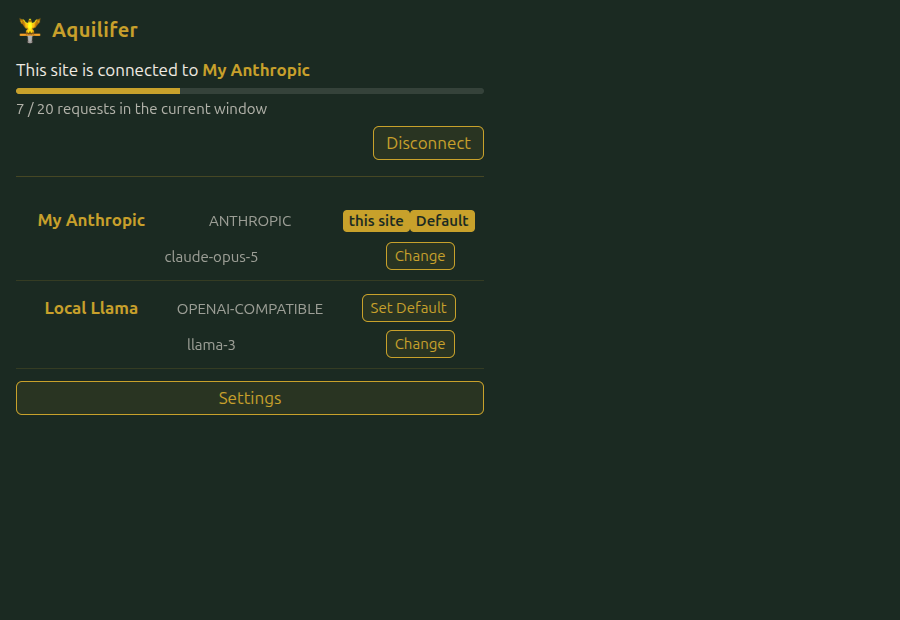
- Every configured provider, with its current model, and a live indicator (a spinning icon) when a request to that provider is actually in flight right now.
- Which provider (if any) the current tab's site is connected to, and that connection's real rate-limit standing: how close it is to being blocked, right now, not just the configured threshold. If a site is close on its per-interface limit but looks fine on the global one (or vice versa; see Rate limiting), the popup shows whichever one is actually closest to blocking, since that's the number that answers "am I about to get rate-limited."
- A Disconnect button for the current site's connection. It revokes that connection immediately; the next request the site makes goes through the connect/approve flow again from scratch, the same as disconnecting it from Options' Connected sites tab.
Managing providers from here
A few things you'd otherwise need Options open for:
- Set default: change which provider new site connections default to.
- Change model: fetches that provider's available models on demand (not automatically every time you open the popup) and lets you pick a different one. Picking any model closes the dropdown back up, including re-picking the one that's already selected if you open it and decide not to change anything.
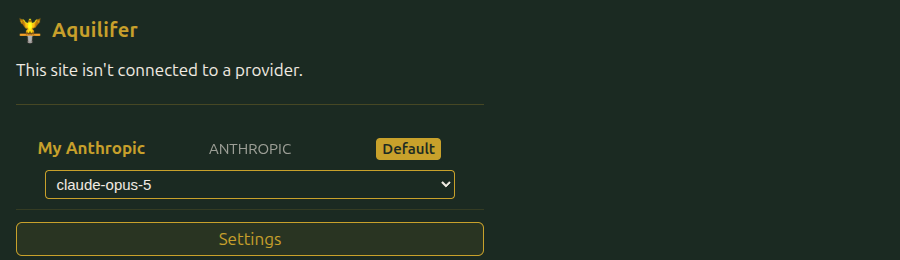
For anything not covered here (adding or removing providers, connected sites, rate-limit settings, history, the vault), see Providers and the rest of the sidebar. The popup is a quick-glance surface, not a replacement for Options; when no providers are configured yet, it links straight there.