
Appearance
Two display preferences, from the Appearance tab in settings, both controlled with sliders: how large the extension's text reads, and how wide the toolbar popup opens.
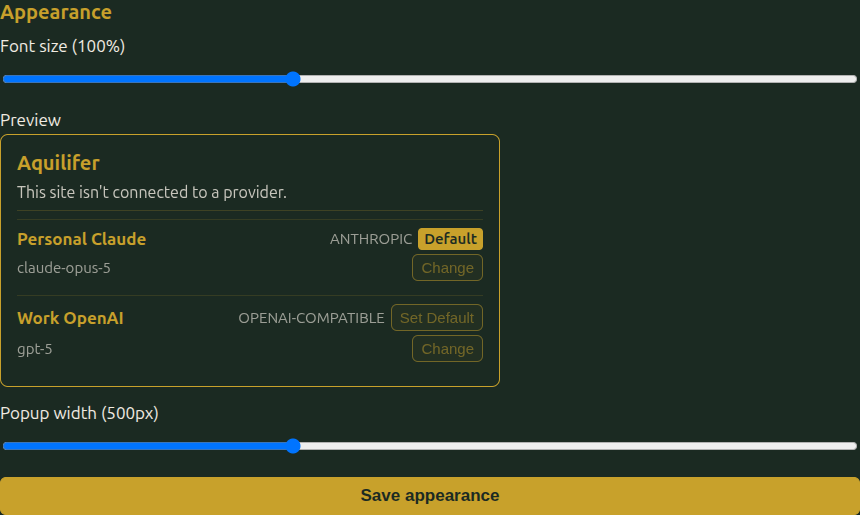
Font size
A single percentage that scales every piece of text together, proportionally, across the popup, settings, and every approval/unlock popup: 100% is the extension's own default size, and the range runs from 50% to 200%. It applies immediately to whichever page you're on as you move the slider, not just after you save.
Popup width
Only affects the toolbar popup's own width, in pixels. The connection-approval, rate-limit, and vault-unlock popups are separate, transient windows sized on their own, so this doesn't change them. The popup's height isn't a setting at all: like any ordinary page, it's just however tall its content happens to be.
A preview box above the slider shows a mock-up of the popup at whatever width you've currently dragged it to, with a fake Anthropic provider and a fake OpenAI-compatible one, the same "not connected to a provider" text an unconnected site sees, and the Default/Set Default/Change controls each provider row has, so you can see what a populated provider list looks like, not just an empty shell. It's built from placeholder text, not the real popup content or its actual behavior (the buttons don't do anything here), since this page can't open a real one to show at true size; its own height is content-driven too, the same as the real popup's.
If you've turned the font size up a lot, you may want to widen the popup too, the same way Aquilifer's own default width was widened when its own text got bigger: a larger font needs more room for the same content to avoid wrapping.